Data table
Install
npx shadcn add @klarhimmel/app-data-tableUsage
import { Theme } from '@/components/klarhimmel/theme/style';
import { BlockSurface } from '@/components/klarhimmel/blocks/surface';
import AppDataTable from '@/components/klarhimmel/blocks/app-data-table';

export default function Section() {
  return (
    <Theme theme="brand">
      <BlockSurface>
        <AppDataTable props={{
          "eyebrow": "Bookings",
          "title": "Upcoming arrivals",
          "description": "Every booking at Exempelhotellet in the next two weeks. Click a column to sort.",
          "caption": "Upcoming arrivals, sortable by column",
          "columns": [
            {
              "label": "Guest",
              "align": "left",
              "sortable": true,
              "kind": "text"
            },
            {
              "label": "Room",
              "align": "left",
              "sortable": true,
              "kind": "text"
            },
            {
              "label": "Arrival",
              "align": "left",
              "sortable": true,
              "kind": "date"
            },
            {
              "label": "Nights",
              "align": "right",
              "sortable": true,
              "kind": "number"
            },
            {
              "label": "Total",
              "align": "right",
              "sortable": true,
              "kind": "number"
            }
          ],
          "rows": [
            {
              "cells": [
                "Maja Lindqvist",
                "Seaside suite",
                "12 Jun",
                "3",
                "4 800 kr"
              ],
              "keys": [
                "",
                "",
                "2026-06-12",
                "3",
                "4800"
              ]
            },
            {
              "cells": [
                "Nils Berg",
                "Garden room",
                "13 Jun",
                "2",
                "2 100 kr"
              ],
              "keys": [
                "",
                "",
                "2026-06-13",
                "2",
                "2100"
              ]
            },
            {
              "cells": [
                "Ada Ek",
                "Attic double",
                "13 Jun",
                "5",
                "5 250 kr"
              ],
              "keys": [
                "",
                "",
                "2026-06-13",
                "5",
                "5250"
              ]
            },
            {
              "cells": [
                "Oskar Holm",
                "Garden room",
                "15 Jun",
                "1",
                "1 050 kr"
              ],
              "keys": [
                "",
                "",
                "2026-06-15",
                "1",
                "1050"
              ]
            },
            {
              "cells": [
                "Sofia Nord",
                "Seaside suite",
                "16 Jun",
                "4",
                "6 400 kr"
              ],
              "keys": [
                "",
                "",
                "2026-06-16",
                "4",
                "6400"
              ]
            }
          ],
          "locale": "sv",
          "density": "comfortable",
          "selectable": false,
          "select": {
            "row": "Select",
            "all": "Select all rows",
            "selected": "selected",
            "clear": "Clear selection",
            "barLabel": "Actions for the selected rows",
            "actions": [
              "Export",
              "Archive"
            ]
          },
          "scrollHint": "Scroll sideways for more columns",
          "sort": {
            "active": "Arrival",
            "direction": "ascending"
          },
          "state": "filled",
          "messages": {
            "loading": "Loading bookings",
            "emptyTitle": "No arrivals in the next two weeks",
            "emptyBody": "New bookings show up here as soon as a guest reserves a room.",
            "emptyAction": "Add a booking",
            "errorTitle": "We could not load the bookings",
            "errorBody": "Check your connection and try again.",
            "retry": "Try again"
          }
        }} />
      </BlockSurface>
    </Theme>
  );
}
States
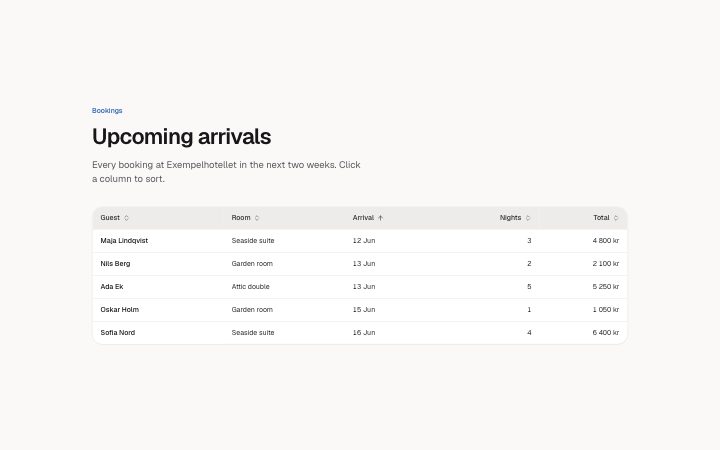
data table in 6 forms: filled, empty, loading, error, compact rows, row selection.
state: filled
Bookings
Upcoming arrivals
Every booking at Exempelhotellet in the next two weeks. Click a column to sort.
selected
Actions for the selected rowsSelect all rows
Select
Upcoming arrivals, sortable by column Maja Lindqvist Seaside suite 12 Jun 3 4 800 kr Nils Berg Garden room 13 Jun 2 2 100 kr Ada Ek Attic double 13 Jun 5 5 250 kr Oskar Holm Garden room 15 Jun 1 1 050 kr Sofia Nord Seaside suite 16 Jun 4 6 400 kr Scroll sideways for more columns
Loading bookings
No arrivals in the next two weeks
New bookings show up here as soon as a guest reserves a room.
We could not load the bookings
Check your connection and try again.state: empty
Bookings
Upcoming arrivals
Every booking at Exempelhotellet in the next two weeks. Click a column to sort.
selected
Actions for the selected rowsSelect all rows
Select
Upcoming arrivals, sortable by column Scroll sideways for more columns
Loading bookings
No arrivals in the next two weeks
New bookings show up here as soon as a guest reserves a room.
We could not load the bookings
Check your connection and try again.state: loading
Bookings
Upcoming arrivals
Every booking at Exempelhotellet in the next two weeks. Click a column to sort.
selected
Actions for the selected rowsSelect all rows
Select
Upcoming arrivals, sortable by column Scroll sideways for more columns
Loading bookings
No arrivals in the next two weeks
New bookings show up here as soon as a guest reserves a room.
We could not load the bookings
Check your connection and try again.state: error
Bookings
Upcoming arrivals
Every booking at Exempelhotellet in the next two weeks. Click a column to sort.
selected
Actions for the selected rowsSelect all rows
Select
Upcoming arrivals, sortable by column Scroll sideways for more columns
Loading bookings
No arrivals in the next two weeks
New bookings show up here as soon as a guest reserves a room.
We could not load the bookings
Check your connection and try again.compact rows
Bookings
Upcoming arrivals
Every booking at Exempelhotellet in the next two weeks. Click a column to sort.
selected
Actions for the selected rowsSelect all rows
Select
Upcoming arrivals, sortable by column Maja Lindqvist Seaside suite 12 Jun 3 4 800 kr Nils Berg Garden room 13 Jun 2 2 100 kr Ada Ek Attic double 13 Jun 5 5 250 kr Oskar Holm Garden room 15 Jun 1 1 050 kr Sofia Nord Seaside suite 16 Jun 4 6 400 kr Scroll sideways for more columns
Loading bookings
No arrivals in the next two weeks
New bookings show up here as soon as a guest reserves a room.
We could not load the bookings
Check your connection and try again.row selection
Bookings
Upcoming arrivals
Every booking at Exempelhotellet in the next two weeks. Click a column to sort.
selected
Actions for the selected rowsUpcoming arrivals, sortable by column Maja Lindqvist Seaside suite 12 Jun 3 4 800 kr Nils Berg Garden room 13 Jun 2 2 100 kr Ada Ek Attic double 13 Jun 5 5 250 kr Oskar Holm Garden room 15 Jun 1 1 050 kr Sofia Nord Seaside suite 16 Jun 4 6 400 kr Scroll sideways for more columns
Loading bookings
No arrivals in the next two weeks
New bookings show up here as soon as a guest reserves a room.
We could not load the bookings
Check your connection and try again.
Notes
When to use it
A sortable table of records with optional row selection and bulk actions. For a handful of invoices use `app-billing-invoices`; for a table where nothing is sorted a simple comparison block is lighter.
Writing for it
- Each column needs a `kind` of text, number or date, and sorting follows it, so 800 kr comes before 12 000 kr. Set `locale` (10), such as sv, for the alphabet. - Add `keys` to a row (30 characters each) when the shown text cannot sort, for example an ISO date behind a text date. They win over the displayed cell. - The first cell in every row is its row header, so put the name there. Rows allow 2 to 6 cells and up to 10 rows.
Watch out for
Turning on `selectable` adds a checkbox column and a bulk action bar of at most 3 actions that appears only once something is picked. The selection exists only in the block, and selecting works only in the filled state.
Pairs well with
Usage
The block in a page, with its default content (long lists shortened). Every prop is in the table below.
import { Theme } from '@/components/klarhimmel/theme/style';
import { BlockSurface } from '@/components/klarhimmel/blocks/surface';
import AppDataTable from '@/components/klarhimmel/blocks/app-data-table';

export default function Section() {
  return (
    <Theme theme="brand">
      <BlockSurface>
        <AppDataTable props={{
          "eyebrow": "Bookings",
          "title": "Upcoming arrivals",
          "description": "Every booking at Exempe…",
          "caption": "Upcoming arrivals, sort…",
          "columns": [
            {
              "label": "Guest",
              "align": "left",
              "sortable": true,
              "kind": "text"
            }
          ],
          "rows": [
            {
              "cells": [
                "Maja Lindqvist"
              ],
              "keys": [
                ""
              ]
            }
          ],
          "locale": "sv",
          "density": "comfortable",
          "selectable": false,
          "select": {
            "row": "Select",
            "all": "Select all rows",
            "selected": "selected",
            "clear": "Clear selection",
            "barLabel": "Actions for the selecte…",
            "actions": [
              "Export"
            ]
          },
          "scrollHint": "Scroll sideways for mor…",
          "sort": {
            "active": "Arrival",
            "direction": "ascending"
          },
          "state": "filled",
          "messages": {
            "loading": "Loading bookings",
            "emptyTitle": "No arrivals in the next…",
            "emptyBody": "New bookings show up he…",
            "emptyAction": "Add a booking",
            "errorTitle": "We could not load the b…",
            "errorBody": "Check your connection a…",
            "retry": "Try again"
          }
        }} />
      </BlockSurface>
    </Theme>
  );
}
Props
The type, default and text limit of every prop. On a real page, over-limit text is kept and checkSections flags it (Installation, Check a page before you ship); this live preview shows the default until it fits. The panel above edits all props.
| Prop | Type | Default | Description |
|---|---|---|---|
eyebrow | string | 'Bookings' | Text, up to 60 characters. Optional; empty is not rendered. |
title | string | 'Upcoming arrivals' | Text, up to 120 characters. |
description | string | 'Every booking at Exempelhotellet in…' | Text, up to 300 characters. Optional; empty is not rendered. |
caption | string | 'Upcoming arrivals, sortable by colu…' | Text, up to 80 characters. |
columns | { label, align, sortable, kind }[] | 5 items | List of 2 to 6. Each item: label, align ('left' | 'right'), sortable, kind ('text' | 'number' | 'date'). |
rows | { cells, keys }[] | 5 items | List of 1 to 10. Each item: cells, keys (optional). |
locale | string | 'sv' | Text, up to 10 characters. |
density | 'comfortable' | 'compact' | 'comfortable' | One of 'comfortable', 'compact'. |
selectable | boolean | false | See the type. |
select | { row, all, selected, clear, barLabel, actions } | {…} | Fields: row, all, selected, clear, barLabel, actions. |
scrollHint | string | 'Scroll sideways for more columns' | Text, up to 40 characters. |
sort | { active, direction } | {…} | Fields: active, direction ('ascending' | 'descending'). |
state | 'filled' | 'empty' | 'loading' | 'error' | 'filled' | One of 'filled', 'empty', 'loading', 'error'. |
messages | { loading, emptyTitle, emptyBody, emptyAction, errorTitle, errorBody, retry } | {…} | Fields: loading, emptyTitle, emptyBody, emptyAction, errorTitle, errorBody, retry. |
headingLevel | '1' | '2' | - | One of '1', '2'. Optional; empty is not rendered. |
Install
Installs
app-data-table- Banner
- Button
- EmptyState
- Skeleton
- About
- A data table: sort buttons that order by what a column holds (text, numbers, dates; aria-sort), a first column that stays in view while the rest scrolls with an edge fade, comfortable or compact rows, optional row selection with select…
- States
- Filled, empty, loading and error. Headers sort in place and carry aria-sort; the region scrolls sideways on a phone.