Invite form
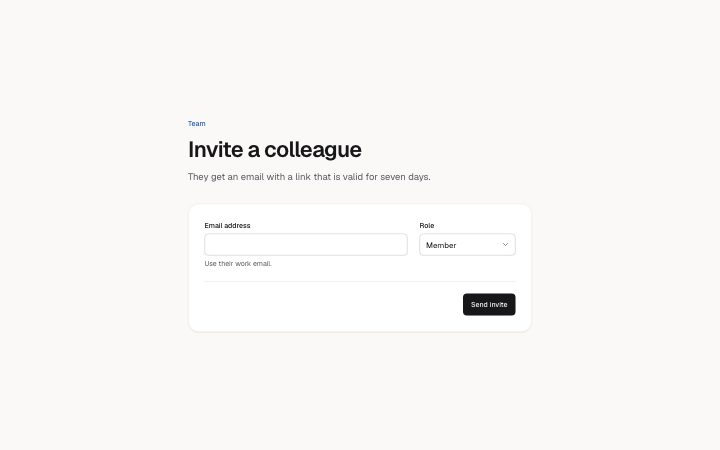
Install
npx shadcn add @klarhimmel/app-team-inviteUsage
import { Theme } from '@/components/klarhimmel/theme/style';
import { BlockSurface } from '@/components/klarhimmel/blocks/surface';
import AppTeamInvite from '@/components/klarhimmel/blocks/app-team-invite';

export default function Section() {
  return (
    <Theme theme="brand">
      <BlockSurface>
        <AppTeamInvite props={{
          "eyebrow": "Team",
          "title": "Invite a colleague",
          "description": "They get an email with a link that is valid for seven days.",
          "emailLabel": "Email address",
          "emailHint": "Use their work email.",
          "sample": "",
          "roleLabel": "Role",
          "roles": [
            "Admin",
            "Member",
            "Viewer"
          ],
          "active": "Member",
          "actions": {
            "send": "Send invite",
            "sending": "Sending…"
          },
          "state": "idle",
          "messages": {
            "sent": "Invite sent. It shows under pending invites.",
            "error": "We could not send the invite. Check the address and try again.",
            "emailError": "Enter an email address like [email protected]."
          }
        }} />
      </BlockSurface>
    </Theme>
  );
}
States
invite form in 4 forms: idle, sending, sent, error.
state: idle
Team
Invite a colleague
They get an email with a link that is valid for seven days.
state: sending
Team
Invite a colleague
They get an email with a link that is valid for seven days.
state: sent
Team
Invite a colleague
They get an email with a link that is valid for seven days.
state: error
Team
Invite a colleague
They get an email with a link that is valid for seven days.
Notes
When to use it
A small form to invite one person by email and role. Use `app-team-pending` after it to show invites not yet accepted and `app-team-members` for those who have joined; this block only collects the address.
Writing for it
- The emailLabel and roleLabel are required, 40 characters each. Use the hint (120) for a rule people get wrong, such as work email only. - roles takes 2 to 5 names of at most 20 characters. active must be one of them, since it sets what the select starts on. - messages.emailError (120) is shown under the field and should show the format, as in [email protected]. The sent message should say where the invite shows up next.
Watch out for
The form checks only the shape of the address with a simple pattern, and it never posts anywhere. sample is the starting value and is usually left empty, so a filled sample appears as if the person had typed it.
Pairs well with
Usage
The block in a page, with its default content (long lists shortened). Every prop is in the table below.
import { Theme } from '@/components/klarhimmel/theme/style';
import { BlockSurface } from '@/components/klarhimmel/blocks/surface';
import AppTeamInvite from '@/components/klarhimmel/blocks/app-team-invite';

export default function Section() {
  return (
    <Theme theme="brand">
      <BlockSurface>
        <AppTeamInvite props={{
          "eyebrow": "Team",
          "title": "Invite a colleague",
          "description": "They get an email with a link that is valid for seven days.",
          "emailLabel": "Email address",
          "emailHint": "Use their work email.",
          "sample": "",
          "roleLabel": "Role",
          "roles": [
            "Admin",
            "Member",
            "Viewer"
          ],
          "active": "Member",
          "actions": {
            "send": "Send invite",
            "sending": "Sending…"
          },
          "state": "idle",
          "messages": {
            "sent": "Invite sent. It shows under pending invites.",
            "error": "We could not send the invite. Check the address and try again.",
            "emailError": "Enter an email address like [email protected]."
          }
        }} />
      </BlockSurface>
    </Theme>
  );
}
Props
The type, default and text limit of every prop. On a real page, over-limit text is kept and checkSections flags it (Installation, Check a page before you ship); this live preview shows the default until it fits. The panel above edits all props.
| Prop | Type | Default | Description |
|---|---|---|---|
eyebrow | string | 'Team' | Text, up to 60 characters. Optional; empty is not rendered. |
title | string | 'Invite a colleague' | Text, up to 120 characters. |
description | string | 'They get an email with a link that …' | Text, up to 300 characters. Optional; empty is not rendered. |
emailLabel | string | 'Email address' | Text, up to 40 characters. |
emailHint | string | 'Use their work email.' | Text, up to 120 characters. Optional; empty is not rendered. |
sample | string | '' | Text, up to 60 characters. |
roleLabel | string | 'Role' | Text, up to 40 characters. |
roles | string[] | 3 items | List of 2 to 5. |
active | string | 'Member' | Text, up to 20 characters. |
actions | { send, sending } | {…} | Fields: send, sending. |
state | 'idle' | 'sending' | 'sent' | 'error' | 'idle' | One of 'idle', 'sending', 'sent', 'error'. |
messages | { sent, error, emailError } | {…} | Fields: sent, error, emailError. |
headingLevel | '1' | '2' | - | One of '1', '2'. Optional; empty is not rendered. |
Install
Installs
app-team-invite- Banner
- Button
- Input
- NativeSelect
- About
- Invite someone: an email field with a hint, a role select and a send button, with four states (idle, sending, sent, error with the field marked and described). Never submits.
- States
- Idle, sending, sent and error (the email field is marked and described). Set with the state prop.