App, pending invites
Install
npx shadcn add @klarhimmel/app-team-pendingUsage
import { Theme } from '@/components/klarhimmel/theme/style';
import { BlockSurface } from '@/components/klarhimmel/blocks/surface';
import AppTeamPending from '@/components/klarhimmel/blocks/app-team-pending';

export default function Section() {
  return (
    <Theme theme="brand">
      <BlockSurface>
        <AppTeamPending props={{
          "eyebrow": "Team",
          "title": "Pending invites",
          "description": "These people have not accepted yet.",
          "invites": [
            {
              "email": "[email protected]",
              "role": "Member",
              "sent": "Sent 2 days ago"
            },
            {
              "email": "[email protected]",
              "role": "Viewer",
              "sent": "Sent 5 days ago"
            },
            {
              "email": "[email protected]",
              "role": "Admin",
              "sent": "Sent today"
            }
          ],
          "actions": {
            "resend": "Resend",
            "revoke": "Revoke",
            "question": "Revoke the invite for",
            "yes": "Yes, revoke",
            "no": "Keep"
          },
          "notices": {
            "resent": "Invite sent again to",
            "revoked": "Invite revoked for"
          },
          "countWord": "pending",
          "state": "filled",
          "messages": {
            "emptyTitle": "No pending invites",
            "emptyBody": "Invites you send show up here until they are accepted."
          }
        }} />
      </BlockSurface>
    </Theme>
  );
}
Install
Import
import Block from '@/components/klarhimmel/blocks/app-team-pending';- app/team-pending
- About
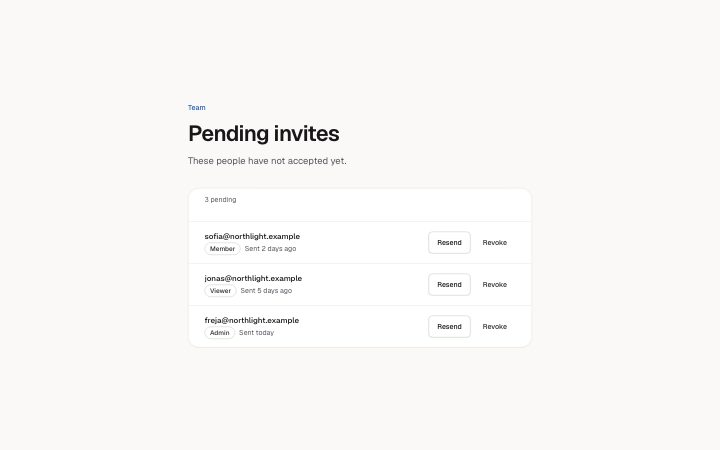
- Invites not yet accepted: address, role and when it was sent, with Resend and Revoke that name their invite.
- Category
- Interface sections for signed-in products.
Notes
When to use it
The list of invitations that have been sent but not accepted, with Resend and Revoke. It follows `app-team-invite` and sits next to `app-team-members`; once someone accepts, they belong in the members list instead.
Writing for it
- Each invite shows an email (60), a role (20) and a sent text (30). Write sent as a phrase, like 'Sent 2 days ago', since the block does not compute dates. - The Revoke question is spoken with the address after it, so write actions.question as a phrase that ends in 'for', and keep it to 40 characters. - notices.resent and notices.revoked (40 each) are followed by the address, so end them with a word that leads into it, such as 'to' or 'for'.
Watch out for
Resend and Revoke change only what is shown. Revoking removes the row from the list on screen, and the pending count drops with it. Between 1 and 6 invites are allowed, and the empty state needs an emptyTitle.
Pairs well with
Usage
The block in a page, with its default content (long lists shortened). Every prop is in the table below.
import { Theme } from '@/components/klarhimmel/theme/style';
import { BlockSurface } from '@/components/klarhimmel/blocks/surface';
import AppTeamPending from '@/components/klarhimmel/blocks/app-team-pending';

export default function Section() {
  return (
    <Theme theme="brand">
      <BlockSurface>
        <AppTeamPending props={{
          "eyebrow": "Team",
          "title": "Pending invites",
          "description": "These people have not accepted yet.",
          "invites": [
            {
              "email": "[email protected]",
              "role": "Member",
              "sent": "Sent 2 days ago"
            },
            {
              "email": "[email protected]",
              "role": "Viewer",
              "sent": "Sent 5 days ago"
            },
            {
              "email": "[email protected]",
              "role": "Admin",
              "sent": "Sent today"
            }
          ],
          "actions": {
            "resend": "Resend",
            "revoke": "Revoke",
            "question": "Revoke the invite for",
            "yes": "Yes, revoke",
            "no": "Keep"
          },
          "notices": {
            "resent": "Invite sent again to",
            "revoked": "Invite revoked for"
          },
          "countWord": "pending",
          "state": "filled",
          "messages": {
            "emptyTitle": "No pending invites",
            "emptyBody": "Invites you send show up here until they are accepted."
          }
        }} />
      </BlockSurface>
    </Theme>
  );
}
Props
The type, default and text limit of every prop. On a real page, over-limit text is kept and checkSections flags it (Installation, Check a page before you ship); this live preview shows the default until it fits. The panel above edits all props.
| Prop | Type | Default | Description |
|---|---|---|---|
eyebrow | string | 'Team' | Text, up to 60 characters. Optional; empty is not rendered. |
title | string | 'Pending invites' | Text, up to 120 characters. |
description | string | 'These people have not accepted yet.' | Text, up to 300 characters. Optional; empty is not rendered. |
invites | { email, role, sent }[] | 3 items | List of 1 to 6. Each item: email, role, sent. |
actions | { resend, revoke, question, yes, no } | {…} | Fields: resend, revoke, question, yes, no. |
notices | { resent, revoked } | {…} | Fields: resent, revoked. |
countWord | string | 'pending' | Text, up to 20 characters. |
state | 'filled' | 'empty' | 'filled' | One of 'filled', 'empty'. |
messages | { emptyTitle, emptyBody } | {…} | Fields: emptyTitle, emptyBody. |
headingLevel | '1' | '2' | - | One of '1', '2'. Optional; empty is not rendered. |