Operations, daily summary
Install
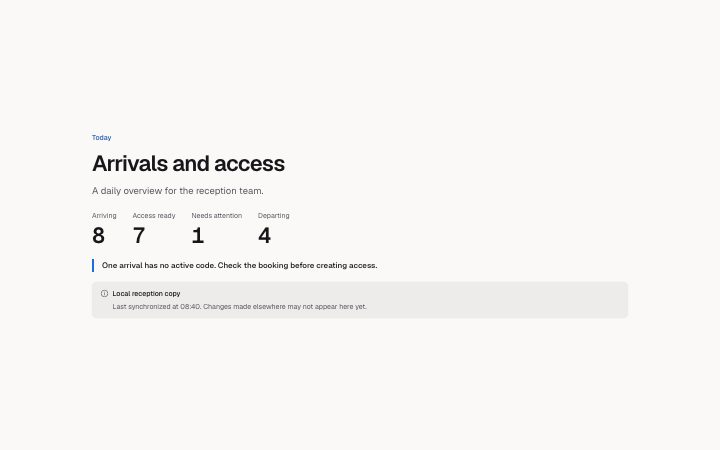
npx shadcn add @klarhimmel/app-operations-summaryUsage
import { Theme } from '@/components/klarhimmel/theme/style';
import { BlockSurface } from '@/components/klarhimmel/blocks/surface';
import AppOperationsSummary from '@/components/klarhimmel/blocks/app-operations-summary';

export default function Section() {
  return (
    <Theme theme="brand">
      <BlockSurface>
        <AppOperationsSummary props={{
          "eyebrow": "Today",
          "title": "Arrivals and access",
          "description": "A daily overview for the reception team.",
          "items": [
            {
              "label": "Arriving",
              "value": "8"
            },
            {
              "label": "Access ready",
              "value": "7"
            },
            {
              "label": "Needs attention",
              "value": "1"
            },
            {
              "label": "Departing",
              "value": "4"
            }
          ],
          "attention": "One arrival has no active code. Check the booking before creating access.",
          "source": "Local reception copy",
          "sourceNote": "Last synchronized at 08:40. Changes made elsewhere may not appear here yet."
        }} />
      </BlockSurface>
    </Theme>
  );
}
Install
Import
import Block from '@/components/klarhimmel/blocks/app-operations-summary';- app/operations-summary
- Category
- Interface sections for signed-in products.
Notes
When to use it
Start a reception or operations screen with the counts people need before opening individual records. Use app-dashboard-stats for measured changes over time rather than a daily readiness line.
Writing for it
- Use short count labels that separate arrivals, departures and records requiring attention. The host must provide the values from one stated scope; the block never reconciles mismatched sources. - Write the sourceNote with the synchronization time and the limitation of a cached copy. Keep the attention sentence specific enough to tell the operator which check to perform next.
Watch out for
A calm layout is not proof of a healthy system. If counts cannot be confirmed, supply that uncertainty in the attention and provenance copy instead of converting missing data into zero.
Pairs well with
Usage
The block in a page, with its default content (long lists shortened). Every prop is in the table below.
import { Theme } from '@/components/klarhimmel/theme/style';
import { BlockSurface } from '@/components/klarhimmel/blocks/surface';
import AppOperationsSummary from '@/components/klarhimmel/blocks/app-operations-summary';

export default function Section() {
  return (
    <Theme theme="brand">
      <BlockSurface>
        <AppOperationsSummary props={{
          "eyebrow": "Today",
          "title": "Arrivals and access",
          "description": "A daily overview for the reception team.",
          "items": [
            {
              "label": "Arriving",
              "value": "8"
            },
            {
              "label": "Access ready",
              "value": "7"
            },
            {
              "label": "Needs attention",
              "value": "1"
            },
            {
              "label": "Departing",
              "value": "4"
            }
          ],
          "attention": "One arrival has no active code. Check the booking before creating access.",
          "source": "Local reception copy",
          "sourceNote": "Last synchronized at 08:40. Changes made elsewhere may not appear here yet."
        }} />
      </BlockSurface>
    </Theme>
  );
}
Props
The type, default and text limit of every prop. On a real page, over-limit text is kept and checkSections flags it (Installation, Check a page before you ship); this live preview shows the default until it fits. The panel above edits all props.
| Prop | Type | Default | Description |
|---|---|---|---|
eyebrow | string | 'Today' | Text, up to 60 characters. |
title | string | 'Arrivals and access' | Text, up to 120 characters. |
description | string | 'A daily overview for the reception …' | Text, up to 300 characters. |
items | { label, value }[] | 4 items | List of 1 to 5. Each item: label, value. |
attention | string | 'One arrival has no active code. Che…' | Text, up to 160 characters. |
source | string | 'Local reception copy' | Text, up to 100 characters. |
sourceNote | string | 'Last synchronized at 08:40. Changes…' | Text, up to 200 characters. |
headingLevel | '1' | '2' | - | One of '1', '2'. Optional; empty is not rendered. |