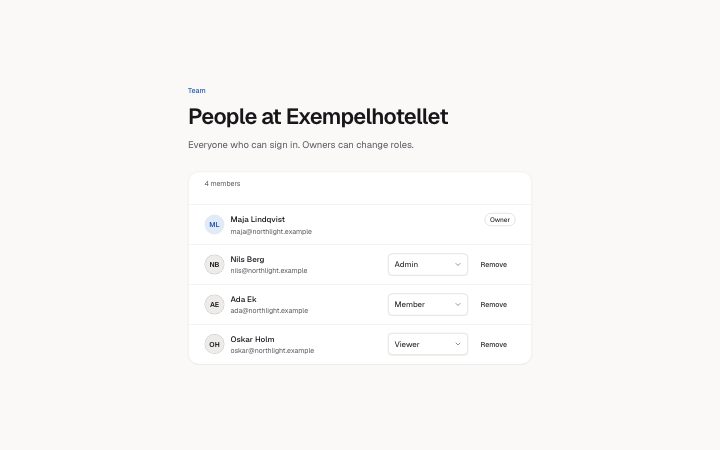
Member list
Install
npx shadcn add @klarhimmel/app-team-membersUsage
import { Theme } from '@/components/klarhimmel/theme/style';
import { BlockSurface } from '@/components/klarhimmel/blocks/surface';
import AppTeamMembers from '@/components/klarhimmel/blocks/app-team-members';

export default function Section() {
  return (
    <Theme theme="brand">
      <BlockSurface>
        <AppTeamMembers props={{
          "eyebrow": "Team",
          "title": "People at Exempelhotellet",
          "description": "Everyone who can sign in. Owners can change roles.",
          "summaryWord": "members",
          "roles": [
            "Owner",
            "Admin",
            "Member",
            "Viewer"
          ],
          "roleLabel": "Role for",
          "members": [
            {
              "name": "Maja Lindqvist",
              "email": "[email protected]",
              "sample": "Owner",
              "locked": true
            },
            {
              "name": "Nils Berg",
              "email": "[email protected]",
              "sample": "Admin",
              "locked": false
            },
            {
              "name": "Ada Ek",
              "email": "[email protected]",
              "sample": "Member",
              "locked": false
            },
            {
              "name": "Oskar Holm",
              "email": "[email protected]",
              "sample": "Viewer",
              "locked": false
            }
          ],
          "remove": {
            "label": "Remove",
            "question": "Remove this person?",
            "yes": "Yes, remove",
            "no": "Keep"
          },
          "notices": {
            "roleNow": "is now",
            "removed": "removed"
          },
          "state": "filled",
          "messages": {
            "emptyTitle": "Only you here so far",
            "emptyBody": "Invite a colleague and they appear in this list."
          }
        }} />
      </BlockSurface>
    </Theme>
  );
}
States
member list in 2 forms: filled, empty.
state: filled
Team
People at Exempelhotellet
Everyone who can sign in. Owners can change roles.
4 members
- Owner
Maja Lindqvist
Nils Berg
Remove this person? Nils Berg
Ada Ek
Remove this person? Ada Ek
Oskar Holm
Remove this person? Oskar Holm
is now
removed
Only you here so far
Invite a colleague and they appear in this list.
state: empty
Team
People at Exempelhotellet
Everyone who can sign in. Owners can change roles.
4 members
- Owner
Maja Lindqvist
Nils Berg
Remove this person? Nils Berg
Ada Ek
Remove this person? Ada Ek
Oskar Holm
Remove this person? Oskar Holm
is now
removed
Only you here so far
Invite a colleague and they appear in this list.
Notes
When to use it
A list of the people on a team, each with a role select and a Remove button. Use `app-team-pending` for invitations that are not accepted yet and `app-team-invite` for adding someone; this one is for people who already have access.
Writing for it
- roles (2 to 5 names, 20 characters) feeds every row's select, so list all of them, including Owner if one row is locked. - Each member's sample must be one of the roles. Set locked: true on the owner so that row shows a badge and has no Remove button. - roleLabel (30) is spoken before the name, so end it with a word like 'Role for'. Write notices.roleNow and notices.removed so they read after the person's name.
Watch out for
Removing a member is a confirm step in the list, but the block removes the row only on screen. With up to 8 members the count in the heading follows the rows that are left, and when it reaches zero the empty message takes over.
Pairs well with
Usage
The block in a page, with its default content (long lists shortened). Every prop is in the table below.
import { Theme } from '@/components/klarhimmel/theme/style';
import { BlockSurface } from '@/components/klarhimmel/blocks/surface';
import AppTeamMembers from '@/components/klarhimmel/blocks/app-team-members';

export default function Section() {
  return (
    <Theme theme="brand">
      <BlockSurface>
        <AppTeamMembers props={{
          "eyebrow": "Team",
          "title": "People at Exempelhotellet",
          "description": "Everyone who can sign in. Owners can change roles.",
          "summaryWord": "members",
          "roles": [
            "Owner",
            "Admin",
            "Member"
          ],
          "roleLabel": "Role for",
          "members": [
            {
              "name": "Maja Lindqvist",
              "email": "[email protected]",
              "sample": "Owner",
              "locked": true
            },
            {
              "name": "Nils Berg",
              "email": "[email protected]",
              "sample": "Admin",
              "locked": false
            },
            {
              "name": "Ada Ek",
              "email": "[email protected]",
              "sample": "Member",
              "locked": false
            }
          ],
          "remove": {
            "label": "Remove",
            "question": "Remove this person?",
            "yes": "Yes, remove",
            "no": "Keep"
          },
          "notices": {
            "roleNow": "is now",
            "removed": "removed"
          },
          "state": "filled",
          "messages": {
            "emptyTitle": "Only you here so far",
            "emptyBody": "Invite a colleague and they appear in this list."
          }
        }} />
      </BlockSurface>
    </Theme>
  );
}
Props
The type, default and text limit of every prop. On a real page, over-limit text is kept and checkSections flags it (Installation, Check a page before you ship); this live preview shows the default until it fits. The panel above edits all props.
| Prop | Type | Default | Description |
|---|---|---|---|
eyebrow | string | 'Team' | Text, up to 60 characters. Optional; empty is not rendered. |
title | string | 'People at Exempelhotellet' | Text, up to 120 characters. |
description | string | 'Everyone who can sign in. Owners ca…' | Text, up to 300 characters. Optional; empty is not rendered. |
summaryWord | string | 'members' | Text, up to 20 characters. |
roles | string[] | 4 items | List of 2 to 5. |
roleLabel | string | 'Role for' | Text, up to 30 characters. |
members | { name, email, sample, locked }[] | 4 items | List of 1 to 8. Each item: name, email, sample, locked. |
remove | { label, question, yes, no } | {…} | Fields: label, question, yes, no. |
notices | { roleNow, removed } | {…} | Fields: roleNow, removed. |
state | 'filled' | 'empty' | 'filled' | One of 'filled', 'empty'. |
messages | { emptyTitle, emptyBody } | {…} | Fields: emptyTitle, emptyBody. |
headingLevel | '1' | '2' | - | One of '1', '2'. Optional; empty is not rendered. |
Install
Installs
app-team-members- Avatar
- Badge
- NativeSelect
- EmptyState
- About
- The people on a team: avatar, name, email and a role select per member, a locked owner row, Remove with a confirmation that keeps focus in the list, role changes and removals announced by name, a count that follows, and an empty state.
- States
- Filled and empty. Every role select is named for its member; the owner row is locked.