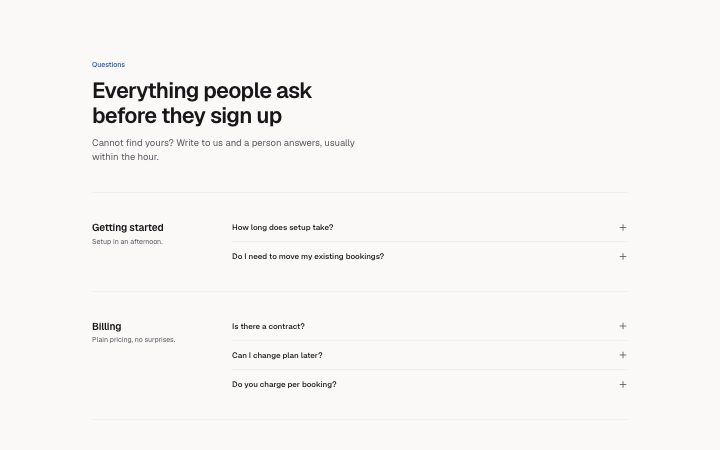
FAQ, grouped
Install
npx shadcn add @klarhimmel/faq-groupedUsage
import { Theme } from '@/components/klarhimmel/theme/style';
import { BlockSurface } from '@/components/klarhimmel/blocks/surface';
import FaqGrouped from '@/components/klarhimmel/blocks/faq-grouped';

export default function Section() {
  return (
    <Theme theme="brand">
      <BlockSurface>
        <FaqGrouped props={{
          "eyebrow": "Questions",
          "title": "Everything people ask before they sign up",
          "description": "Cannot find yours? Write to us and a person answers, usually within the hour.",
          "groups": [
            {
              "name": "Getting started",
              "summary": "Setup in an afternoon.",
              "items": [
                {
                  "question": "How long does setup take?",
                  "answer": "Most properties are live the same day. Import your rooms and rates from a spreadsheet, check the preview, and publish."
                },
                {
                  "question": "Do I need to move my existing bookings?",
                  "answer": "No. Keep them where they are. Northlight reads your calendar and only adds new bookings going forward."
                }
              ]
            },
            {
              "name": "Billing",
              "summary": "Plain pricing, no surprises.",
              "items": [
                {
                  "question": "Is there a contract?",
                  "answer": "No. Plans renew monthly and you can cancel from the settings page. We refund the unused part of the month."
                },
                {
                  "question": "Can I change plan later?",
                  "answer": "Any time. The change applies from the next day and the difference is credited automatically."
                },
                {
                  "question": "Do you charge per booking?",
                  "answer": "No. The price is the price. Payment providers charge their own fees, and we show them to you in the invoice."
                }
              ]
            },
            {
              "name": "Privacy and data",
              "summary": "Your guests, your data.",
              "items": [
                {
                  "question": "Where is guest data stored?",
                  "answer": "In the EU, encrypted at rest. We never sell or share guest details, and you can export or delete everything yourself."
                },
                {
                  "question": "Is it GDPR compliant?",
                  "answer": "Yes. We sign a data processing agreement with every customer, on request and at no cost."
                }
              ]
            }
          ]
        }} />
      </BlockSurface>
    </Theme>
  );
}
Install
Import
import Block from '@/components/klarhimmel/blocks/faq-grouped';- faq/grouped
- About
- Questions organised under named topics (billing, setup, privacy). Each topic is a labelled row with its own accordion beside it. Use when you have more than eight questions.
- Category
- The questions people ask before they buy.
Notes
When to use it
A long help section sorted under named topics such as billing or privacy, each topic a labelled row with its own accordion. Worth it from about nine questions; for fewer, `faq-list` is lighter.
Writing for it
- A group name holds 60 characters and works as a h3 label in a 14rem-wide side column, so use one or two words like 'Billing'. - The optional summary (120) sits under the name as a one-line promise of what the group covers; leave it empty and the line is simply not drawn. - Plan two to four groups with one to six questions each. Those are the schema limits, and a group with a single question looks thin next to a full one.
Watch out for
The block caps out at four groups of six, so 24 questions in total; a fifth topic cannot be added and has to be merged into an existing one. In the editor all answers show open, so check the closed state in a preview.
Usage
The block in a page, with its default content (long lists shortened). Every prop is in the table below.
import { Theme } from '@/components/klarhimmel/theme/style';
import { BlockSurface } from '@/components/klarhimmel/blocks/surface';
import FaqGrouped from '@/components/klarhimmel/blocks/faq-grouped';

export default function Section() {
  return (
    <Theme theme="brand">
      <BlockSurface>
        <FaqGrouped props={{
          "eyebrow": "Questions",
          "title": "Everything people ask before they sign up",
          "description": "Cannot find yours? Write to us and a person answers, usually within the hour.",
          "groups": [
            {
              "name": "Getting started",
              "summary": "Setup in an afternoon.",
              "items": [
                {
                  "question": "How long does setup take?",
                  "answer": "Most properties are live the same day. Import your rooms and rates from a spreadsheet, check the preview, and publish."
                },
                {
                  "question": "Do I need to move my existing bookings?",
                  "answer": "No. Keep them where they are. Northlight reads your calendar and only adds new bookings going forward."
                }
              ]
            },
            {
              "name": "Billing",
              "summary": "Plain pricing, no surprises.",
              "items": [
                {
                  "question": "Is there a contract?",
                  "answer": "No. Plans renew monthly and you can cancel from the settings page. We refund the unused part of the month."
                },
                {
                  "question": "Can I change plan later?",
                  "answer": "Any time. The change applies from the next day and the difference is credited automatically."
                }
              ]
            }
          ]
        }} />
      </BlockSurface>
    </Theme>
  );
}
Props
The type, default and text limit of every prop. On a real page, over-limit text is kept and checkSections flags it (Installation, Check a page before you ship); this live preview shows the default until it fits. The panel above edits all props.
| Prop | Type | Default | Description |
|---|---|---|---|
eyebrow | string | 'Questions' | Text, up to 60 characters. |
title | string | 'Everything people ask before they s…' | Text, up to 120 characters. |
description | string | 'Cannot find yours? Write to us and …' | Text, up to 300 characters. |
groups | { name, summary, items }[] | 3 items | List of 2 to 4. Each item: name, summary, items. |
headingLevel | '1' | '2' | - | One of '1', '2'. Optional; empty is not rendered. |