FAQ, with a support card
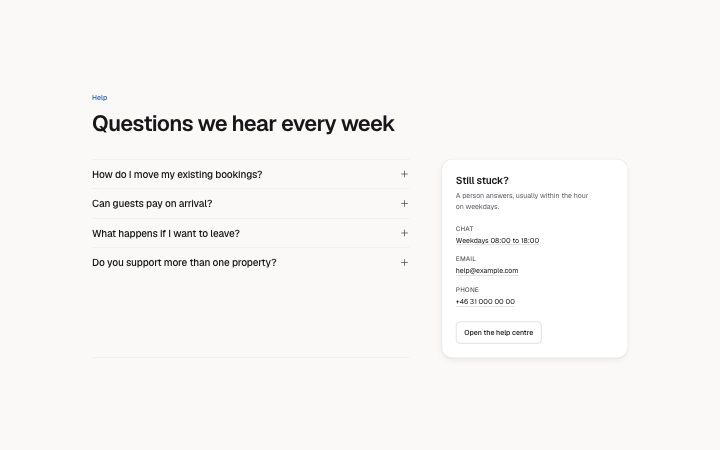
Install
npx shadcn add @klarhimmel/faq-supportUsage
import { Theme } from '@/components/klarhimmel/theme/style';
import { BlockSurface } from '@/components/klarhimmel/blocks/surface';
import FaqSupport from '@/components/klarhimmel/blocks/faq-support';

export default function Section() {
  return (
    <Theme theme="brand">
      <BlockSurface>
        <FaqSupport props={{
          "eyebrow": "Help",
          "title": "Questions we hear every week",
          "description": "",
          "items": [
            {
              "question": "How do I move my existing bookings?",
              "answer": "You do not have to. Northlight reads your calendar and only adds new bookings going forward. Old ones stay where they are."
            },
            {
              "question": "Can guests pay on arrival?",
              "answer": "Yes. Choose per rate whether guests pay now, pay a deposit, or pay at the front desk. Cards are never stored in your inbox."
            },
            {
              "question": "What happens if I want to leave?",
              "answer": "Export every booking and guest as a spreadsheet in one click. We delete your data within 30 days if you ask."
            },
            {
              "question": "Do you support more than one property?",
              "answer": "Yes, from the Studio plan. Each property has its own page, calendar and rates, and one login."
            }
          ],
          "support": {
            "title": "Still stuck?",
            "text": "A person answers, usually within the hour on weekdays.",
            "channels": [
              {
                "label": "Chat",
                "value": "Weekdays 08:00 to 18:00",
                "href": "#chat"
              },
              {
                "label": "Email",
                "value": "[email protected]",
                "href": "mailto:[email protected]"
              },
              {
                "label": "Phone",
                "value": "+46 31 000 00 00",
                "href": "tel:+46310000000"
              }
            ],
            "cta": {
              "label": "Open the help centre",
              "href": "#help"
            }
          }
        }} />
      </BlockSurface>
    </Theme>
  );
}
Install
Import
import Block from '@/components/klarhimmel/blocks/faq-support';- faq/support
- About
- An accordion of questions beside a raised "still stuck?" card with up to three ways to reach a person and one action. For products where the real answer is often a conversation.
- Category
- The questions people ask before they buy.
Notes
When to use it
An accordion with a raised 'still stuck?' card beside it, for products where the real answer is often a conversation. If the questions are the whole point and no contact is needed, use `faq-list`.
Writing for it
- The support card title is required and holds 60 characters; 'Still stuck?' works because it speaks to someone who just read the list and found nothing. - Each channel has a label (30), a value (80) and an href (300). Give the label the medium and the value the hours or address, as in 'Chat' with 'Weekdays 08:00 to 18:00'. - The card's single cta is a secondary button, so send it to a help centre or booking page and leave the primary weight to the rest of the page.
Watch out for
A channel value is a link only when both href and value are filled; with an href but no value, nothing is drawn for it outside the editor. The card is sticky on wide containers, so a very tall accordion keeps it in view while scrolling.
Pairs well with
Usage
The block in a page, with its default content (long lists shortened). Every prop is in the table below.
import { Theme } from '@/components/klarhimmel/theme/style';
import { BlockSurface } from '@/components/klarhimmel/blocks/surface';
import FaqSupport from '@/components/klarhimmel/blocks/faq-support';

export default function Section() {
  return (
    <Theme theme="brand">
      <BlockSurface>
        <FaqSupport props={{
          "eyebrow": "Help",
          "title": "Questions we hear every week",
          "description": "",
          "items": [
            {
              "question": "How do I move my existing bookings?",
              "answer": "You do not have to. Northlight reads your calendar and only adds new bookings going forward. Old ones stay where they a…"
            },
            {
              "question": "Can guests pay on arrival?",
              "answer": "Yes. Choose per rate whether guests pay now, pay a deposit, or pay at the front desk. Cards are never stored in your in…"
            }
          ],
          "support": {
            "title": "Still stuck?",
            "text": "A person answers, usually within the hour on weekdays.",
            "channels": [
              {
                "label": "Chat",
                "value": "Weekdays 08:00 to 18:00",
                "href": "#chat"
              },
              {
                "label": "Email",
                "value": "[email protected]",
                "href": "mailto:[email protected]"
              }
            ],
            "cta": {
              "label": "Open the help centre",
              "href": "#help"
            }
          }
        }} />
      </BlockSurface>
    </Theme>
  );
}
Props
The type, default and text limit of every prop. On a real page, over-limit text is kept and checkSections flags it (Installation, Check a page before you ship); this live preview shows the default until it fits. The panel above edits all props.
| Prop | Type | Default | Description |
|---|---|---|---|
eyebrow | string | 'Help' | Text, up to 60 characters. |
title | string | 'Questions we hear every week' | Text, up to 120 characters. |
description | string | '' | Text, up to 300 characters. |
items | { question, answer }[] | 4 items | List of 2 to 8. Each item: question, answer. |
support | { title, text, channels, cta } | {…} | Fields: title, text, channels, cta. |
headingLevel | '1' | '2' | - | One of '1', '2'. Optional; empty is not rendered. |