Activity log
Install
npx shadcn add @klarhimmel/activity-logUsage
import { Theme } from '@/components/klarhimmel/theme/style';
import { BlockSurface } from '@/components/klarhimmel/blocks/surface';
import ActivityLog from '@/components/klarhimmel/blocks/activity-log';

export default function Section() {
  return (
    <Theme theme="brand">
      <BlockSurface>
        <ActivityLog props={{
          "eyebrow": "Activity",
          "title": "Every change, written down",
          "description": "What happened on the Northlight site overnight, in plain words. Nothing is changed without a line in the log.",
          "link": {
            "label": "See a full week",
            "href": "#log"
          },
          "rows": [
            {
              "time": "02:14",
              "actor": "Agent",
              "event": "Nightly checks ran on 38 pages. No broken links.",
              "badge": "Done",
              "badgeTone": "neutral"
            },
            {
              "time": "02:31",
              "actor": "Agent",
              "event": "The contact form stopped sending. Restored the mail route and sent a test.",
              "badge": "Fixed",
              "badgeTone": "outline"
            },
            {
              "time": "06:05",
              "actor": "Agent",
              "event": "Compressed 12 new images on the blog.",
              "badge": "Done",
              "badgeTone": "neutral"
            },
            {
              "time": "08:40",
              "actor": "Studio",
              "event": "Reviewed the overnight fixes.",
              "badge": "Done",
              "badgeTone": "neutral"
            },
            {
              "time": "09:02",
              "actor": "Agent",
              "event": "Weekly report sent: three fixes, nothing open.",
              "badge": "Done",
              "badgeTone": "neutral"
            }
          ],
          "needsYou": {
            "time": "09:15",
            "actor": "Agent",
            "event": "New pricing copy is ready for your approval.",
            "badge": "Needs you",
            "badgeTone": "accent",
            "action": {
              "label": "Review the change",
              "href": "#review"
            }
          }
        }} />
      </BlockSurface>
    </Theme>
  );
}
Install
Import
import Block from '@/components/klarhimmel/blocks/activity-log';- features/activity-log
- About
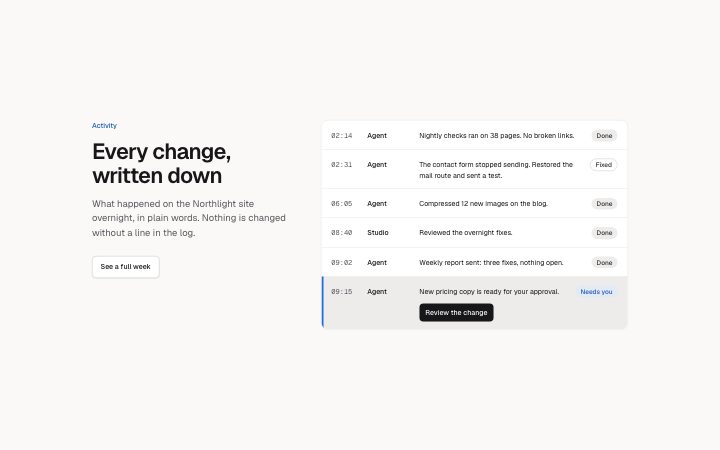
- A heading beside a timed log of work: time, actor, one-line event and a status badge per row, with an optional highlighted row that needs the reader and one action. Static, no animation.
- Category
- What it does, as a grid, a list, tabs or alternating rows.
Notes
When to use it
A dated log of events that shows a product working, with one row that waits on the reader. Use it to prove automation or agent work; `steps-timeline` is for explaining a process rather than showing activity.
Writing for it
- Rows take two to eight entries with time (12), actor (24) and event (140). Use real-looking times and a named actor so the log reads like output. - The badge holds 20 characters and badgeTone picks neutral, accent or outline. Reserve accent for the one outcome that matters. - The needsYou row is optional and carries its own action link. Use it for the one thing that needs a human decision.
Watch out for
needsYou is drawn after all the normal rows, highlighted, and only when the field exists. It counts on top of the eight rows, so the list can reach nine lines.
Pairs well with
Usage
The block in a page, with its default content (long lists shortened). Every prop is in the table below.
import { Theme } from '@/components/klarhimmel/theme/style';
import { BlockSurface } from '@/components/klarhimmel/blocks/surface';
import ActivityLog from '@/components/klarhimmel/blocks/activity-log';

export default function Section() {
  return (
    <Theme theme="brand">
      <BlockSurface>
        <ActivityLog props={{
          "eyebrow": "Activity",
          "title": "Every change, written down",
          "description": "What happened on the Northlight site overnight, in plain words. Nothing is changed without a line in the log.",
          "link": {
            "label": "See a full week",
            "href": "#log"
          },
          "rows": [
            {
              "time": "02:14",
              "actor": "Agent",
              "event": "Nightly checks ran on 38 pages. No broken links.",
              "badge": "Done",
              "badgeTone": "neutral"
            },
            {
              "time": "02:31",
              "actor": "Agent",
              "event": "The contact form stopped sending. Restored the mail route and sent a test.",
              "badge": "Fixed",
              "badgeTone": "outline"
            },
            {
              "time": "06:05",
              "actor": "Agent",
              "event": "Compressed 12 new images on the blog.",
              "badge": "Done",
              "badgeTone": "neutral"
            }
          ],
          "needsYou": {
            "time": "09:15",
            "actor": "Agent",
            "event": "New pricing copy is ready for your approval.",
            "badge": "Needs you",
            "badgeTone": "accent",
            "action": {
              "label": "Review the change",
              "href": "#review"
            }
          }
        }} />
      </BlockSurface>
    </Theme>
  );
}
Props
The type, default and text limit of every prop. On a real page, over-limit text is kept and checkSections flags it (Installation, Check a page before you ship); this live preview shows the default until it fits. The panel above edits all props.
| Prop | Type | Default | Description |
|---|---|---|---|
eyebrow | string | 'Activity' | Text, up to 60 characters. |
title | string | 'Every change, written down' | Text, up to 120 characters. |
description | string | 'What happened on the Northlight sit…' | Text, up to 300 characters. |
link | Link | {…} | See the type. |
rows | { time, actor, event, badge, badgeTone }[] | 5 items | List of 2 to 8. Each item: time, actor, event, badge, badgeTone ('neutral' | 'accent' | 'outline'). |
needsYou | { time, actor, event, badge, badgeTone, action } | {…} | Fields: time, actor, event, badge, badgeTone ('neutral' | 'accent' | 'outline'), action. Optional; empty is not rendered. |
headingLevel | '1' | '2' | - | One of '1', '2'. Optional; empty is not rendered. |