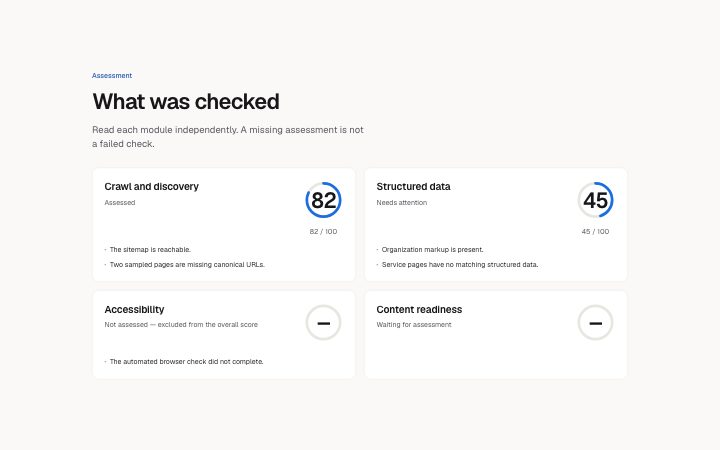
Audit, module scores
Install
npx shadcn add @klarhimmel/report-audit-modulesUsage
import { Theme } from '@/components/klarhimmel/theme/style';
import { BlockSurface } from '@/components/klarhimmel/blocks/surface';
import ReportAuditModules from '@/components/klarhimmel/blocks/report-audit-modules';

export default function Section() {
  return (
    <Theme theme="brand">
      <BlockSurface>
        <ReportAuditModules props={{
          "eyebrow": "Assessment",
          "title": "What was checked",
          "description": "Read each module independently. A missing assessment is not a failed check.",
          "modules": [
            {
              "title": "Crawl and discovery",
              "state": "scored",
              "score": 82,
              "status": "Assessed",
              "findings": [
                "The sitemap is reachable.",
                "Two sampled pages are missing canonical URLs."
              ]
            },
            {
              "title": "Structured data",
              "state": "scored",
              "score": 45,
              "status": "Needs attention",
              "findings": [
                "Organization markup is present.",
                "Service pages have no matching structured data."
              ]
            },
            {
              "title": "Accessibility",
              "state": "unavailable",
              "score": null,
              "status": "Not assessed — excluded from the overall score",
              "findings": [
                "The automated browser check did not complete."
              ]
            },
            {
              "title": "Content readiness",
              "state": "pending",
              "score": null,
              "status": "Waiting for assessment",
              "findings": []
            }
          ]
        }} />
      </BlockSurface>
    </Theme>
  );
}
Install
Import
import Block from '@/components/klarhimmel/blocks/report-audit-modules';- report/audit-modules
- Category
- A document for a reader: key figures, decisions with a recommended default, long-cell tables, timelines, callouts, sources and prose. Rendered to one HTML file by kh-report.
Notes
When to use it
Show independent audit checks after the overall verdict so the reader can see coverage as well as results. Use report-table for comparisons that have no bounded module scores.
Writing for it
- Use the state field to distinguish scored, pending and unavailable checks. Give an unavailable module a status sentence explaining why it was excluded; avoid reporting a fabricated failure score. - Put concrete observations in findings, with one short statement per entry. Each module should carry enough evidence to explain its score without repeating the entire report introduction.
Watch out for
Changing a module to unavailable hides its numeric reading even if an old score is still supplied. These cards never infer completion from the presence of findings.
Pairs well with
Usage
The block in a page, with its default content (long lists shortened). Every prop is in the table below.
import { Theme } from '@/components/klarhimmel/theme/style';
import { BlockSurface } from '@/components/klarhimmel/blocks/surface';
import ReportAuditModules from '@/components/klarhimmel/blocks/report-audit-modules';

export default function Section() {
  return (
    <Theme theme="brand">
      <BlockSurface>
        <ReportAuditModules props={{
          "eyebrow": "Assessment",
          "title": "What was checked",
          "description": "Read each module independently. A missing assessment is not a failed check.",
          "modules": [
            {
              "title": "Crawl and discovery",
              "state": "scored",
              "score": 82,
              "status": "Assessed",
              "findings": [
                "The sitemap is reachable.",
                "Two sampled pages are missing canonical URLs."
              ]
            },
            {
              "title": "Structured data",
              "state": "scored",
              "score": 45,
              "status": "Needs attention",
              "findings": [
                "Organization markup is present.",
                "Service pages have no matching structured data."
              ]
            },
            {
              "title": "Accessibility",
              "state": "unavailable",
              "score": null,
              "status": "Not assessed — excluded from the overall score",
              "findings": [
                "The automated browser check did not complete."
              ]
            },
            {
              "title": "Content readiness",
              "state": "pending",
              "score": null,
              "status": "Waiting for assessment",
              "findings": []
            }
          ]
        }} />
      </BlockSurface>
    </Theme>
  );
}
Props
The type, default and text limit of every prop. On a real page, over-limit text is kept and checkSections flags it (Installation, Check a page before you ship); this live preview shows the default until it fits. The panel above edits all props.
| Prop | Type | Default | Description |
|---|---|---|---|
eyebrow | string | 'Assessment' | Text, up to 60 characters. |
title | string | 'What was checked' | Text, up to 120 characters. |
description | string | 'Read each module independently. A m…' | Text, up to 300 characters. |
modules | { title, state, score, status, findings }[] | 4 items | List of 1 to 8. Each item: title, state ('scored' | 'unavailable' | 'pending'), score, status, findings. |
headingLevel | '1' | '2' | - | One of '1', '2'. Optional; empty is not rendered. |