Report, prose
Install
npx shadcn add @klarhimmel/report-proseUsage
import { Theme } from '@/components/klarhimmel/theme/style';
import { BlockSurface } from '@/components/klarhimmel/blocks/surface';
import ReportProse from '@/components/klarhimmel/blocks/report-prose';

export default function Section() {
  return (
    <Theme theme="brand">
      <BlockSurface>
        <ReportProse props={{
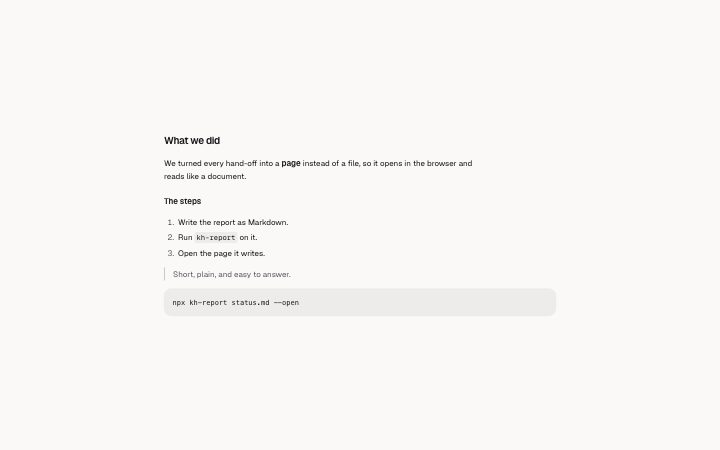
          "title": "What we did",
          "lead": "",
          "blocks": [
            {
              "kind": "p",
              "text": "We turned every hand-off into a **page** instead of a file, so it opens in the browser and reads like a document.",
              "items": []
            },
            {
              "kind": "h3",
              "text": "The steps",
              "items": []
            },
            {
              "kind": "ol",
              "text": "",
              "items": [
                "Write the report as Markdown.",
                "Run `kh-report` on it.",
                "Open the page it writes."
              ]
            },
            {
              "kind": "quote",
              "text": "Short, plain, and easy to answer.",
              "items": []
            },
            {
              "kind": "code",
              "text": "npx kh-report status.md --open",
              "items": []
            }
          ]
        }} />
      </BlockSurface>
    </Theme>
  );
}
Install
Import
import Block from '@/components/klarhimmel/blocks/report-prose';- report/prose
- About
- A headed section of text for everything else in a report: paragraphs, a smaller heading, bulleted and numbered lists, a quote, a code block. **bold**, `code` and [links](https://…) work inside the text.
- Category
- A document for a reader: key figures, decisions with a recommended default, long-cell tables, timelines, callouts, sources and prose. Rendered to one HTML file by kh-report.
Notes
When to use it
A headed section of running text for everything the other report blocks do not cover: paragraphs, a small heading, lists, a quote or a code sample. If the content is figures use `report-stats`, and if it is dated events use `report-timeline`.
Writing for it
- Each entry in blocks has a kind (p, h3, ul, ol, quote, code). Paragraphs, headings, quotes and code take text, up to 4000 characters, while lists take items instead. - Lists hold up to 40 items of 800 characters each, and up to 60 pieces can sit in one block. Split a long section across two blocks with their own titles before you reach that. - Bold, inline code and links work inside text, so link to the source in the sentence that makes the claim rather than collecting links at the end.
Watch out for
For ul and ol the text field is ignored and only items are drawn, and for the other kinds items is ignored. Filling the wrong one of the two leaves the piece empty.
Pairs well with
Usage
The block in a page, with its default content (long lists shortened). Every prop is in the table below.
import { Theme } from '@/components/klarhimmel/theme/style';
import { BlockSurface } from '@/components/klarhimmel/blocks/surface';
import ReportProse from '@/components/klarhimmel/blocks/report-prose';

export default function Section() {
  return (
    <Theme theme="brand">
      <BlockSurface>
        <ReportProse props={{
          "title": "What we did",
          "lead": "",
          "blocks": [
            {
              "kind": "p",
              "text": "We turned every hand-off into a **page** instead of a file, so it opens in the browser and reads like a document.",
              "items": []
            },
            {
              "kind": "h3",
              "text": "The steps",
              "items": []
            },
            {
              "kind": "ol",
              "text": "",
              "items": [
                "Write the report as Markdown.",
                "Run `kh-report` on it.",
                "Open the page it writes."
              ]
            },
            {
              "kind": "quote",
              "text": "Short, plain, and easy to answer.",
              "items": []
            },
            {
              "kind": "code",
              "text": "npx kh-report status.md --open",
              "items": []
            }
          ]
        }} />
      </BlockSurface>
    </Theme>
  );
}
Props
The type, default and text limit of every prop. On a real page, over-limit text is kept and checkSections flags it (Installation, Check a page before you ship); this live preview shows the default until it fits. The panel above edits all props.
| Prop | Type | Default | Description |
|---|---|---|---|
title | string | 'What we did' | Text, up to 100 characters. |
lead | string | '' | Text, up to 400 characters. |
blocks | { kind, text, items }[] | 5 items | List of up to 60. Each item: kind ('p' | 'h3' | 'ul' | 'ol' | 'quote' | 'code'), text, items. |
headingLevel | '1' | '2' | - | One of '1', '2'. Optional; empty is not rendered. |